A design inspiration library your whole team can find things in
Designers collect constantly: UI patterns, sites with great type, component libraries, plugins, icon sets, articles, the competitor flow you screenshotted at midnight. Most of it ends up scattered across a Pinterest board, an Are.na channel, design-file comments and a Slack thread nobody can scroll back to. Linkbry keeps design references and resources in one shared, tagged library with visual previews — and publishes any folder as a page for a client or the rest of the company.
Last updated
In short
Linkbry is a shared reference library for design teams: save sites, UI inspiration, tools and assets in one click (images and screenshots too), organize them with folders and tags, search by what you wrote about them, and share a folder with clients as a read-only page. It isn’t a moodboard canvas — for free-form boards, pair it with your design tool, Milanote or Are.na.
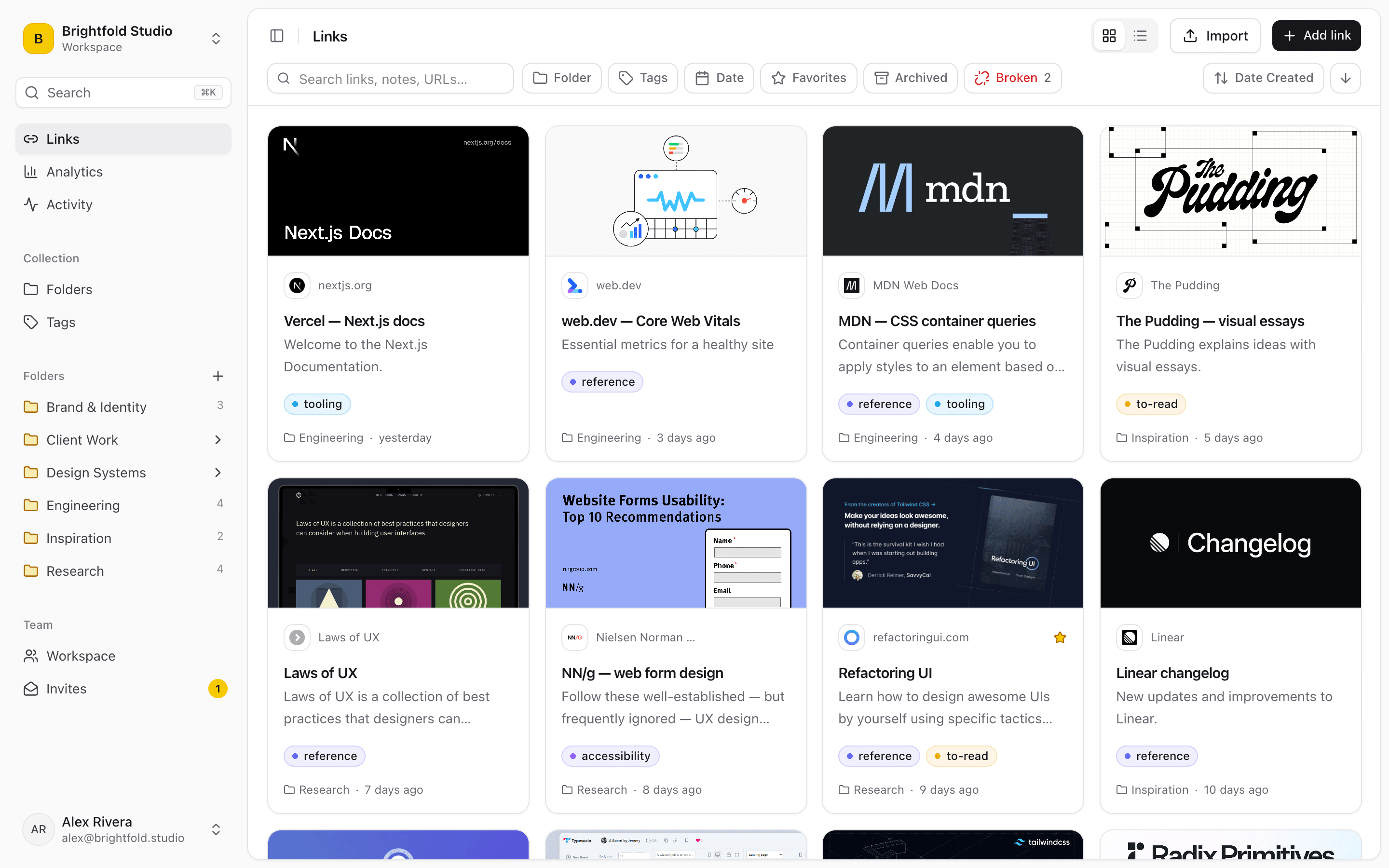
What design teams use Linkbry for
A team inspiration library
UI patterns, landing pages, motion, illustration and typography in one place, tagged by pattern — onboarding, pricing, empty states, dashboards — so “show me good pricing pages” is a filter, not a memory test.
Design resources and tools
Fonts, icon sets, plugins, colour and accessibility tools, stock libraries and tutorials in one list the whole team uses. New designers get it on day one instead of rebuilding it over a year.
Design system references
Docs, tokens, the component library, accessibility guidelines and naming conventions in one folder. Give the most-used ones go links — go/ds, go/icons — that open from the address bar with the extension.
Reference pages for clients
Share “direction two” as a branded, password-protected page of references instead of exporting another PDF. Update the folder and the client’s page updates with it.
Competitive and UX audits
Save competitor flows with the extension’s “Save screenshot”, note what works and what doesn’t, and tag by product area. Months later, search finds them by your notes.
Handoff links
Design files, prototypes, specs and the component docs for each project in one folder. Engineers insert any of them into a ticket or pull request by typing ;;.
Brand assets for the rest of the company
Logos, brand guidelines and templates in a folder everyone can open, embedded in the company’s Notion or intranet so marketing and sales stop asking design for the logo.
Critique in context
Comment on a saved reference and @mention a teammate; they get an in-app notification and the conversation stays attached to the thing you’re discussing.
Why inspiration folders stop working
Every designer has saved thousands of references. The trouble is getting them back — and getting them to anyone else.
- Pinterest and Are.na boards are personal, and discovery feeds bury what you saved
- Screenshots pile up in a desktop folder with names like “Screen Shot 2026-03-14”
- Browser bookmarks have no previews, tags or notes
- References shared in Slack scroll away within a day
- When a designer leaves, their library leaves with them
Visual previews, searchable notes
Paste or save a URL and Linkbry fetches the page’s title, description, preview image and favicon, so the grid view reads like a board. Add tags for pattern, platform and style, and a note on why it’s good — “great empty state for a data-heavy table”. Search matches titles, URLs, descriptions, notes and the readable text of saved pages.
Save it before you lose it
The Chrome extension saves the page you’re on in one click, with a folder and tags. Right-click any link to save it without opening it, or use “Save image” and “Save screenshot” to keep a stored copy — useful for campaign pages and product flows that won’t exist next month. Uploaded images and files count toward the plan’s storage: 100 MB on Free, 20 GB on Pro.
Share references with clients and stakeholders
Publish any folder, subfolders included, as a read-only page with the client’s name, your logo and accent colour. Add a password and an expiry date, see views and clicks per reference, and let a signed-in visitor save a copy into their own workspace. Your notes stay private.
Linkbry and moodboard tools
Be clear about what Linkbry is. Milanote and Figma are canvases where you arrange things spatially; Are.na and Pinterest are for discovery and personal collecting; Eagle is a local asset manager. Linkbry is a shared, searchable library of links, images and files organized in folders and tags, with pages you can hand to a client. Many teams use it as the source library and build the moodboard itself in their canvas tool.
What it costs a design team
A solo designer can use the Free plan: 100 items and shared pages. On Pro, each designer who curates is $10 a month or $100 a year, and engineers, PMs and marketers who only need to browse are free viewers.
A starter workspace for a design team
| Folder | What goes in it | Who sees it |
|---|---|---|
| Inspiration / UI patterns | Onboarding, pricing, dashboards, empty states, tagged by pattern | The design team |
| Inspiration / Brand & type | Identity work, type pairings, illustration, motion | The design team |
| Resources | Fonts, icons, plugins, stock, colour and accessibility tools | Everyone (viewers are free) |
| Design system | Docs, component library, tokens, guidelines, go links | Design and engineering |
| Clients / Meridian / References | Approved direction, examples, the moodboard link | The client, via a password-protected page |
Frequently asked questions
For keeping and sharing references, yes: it’s ad-free, private to your workspace, has folders, tags and notes, and is built for teams. It has no discovery feed — you bring the references in.
Yes. The Chrome extension has “Save image” and “Save screenshot”, and the web app accepts uploads. They’re stored copies, so they don’t disappear when the source page does. Storage is 100 MB on Free (10 MB per file) and 20 GB on Pro (100 MB per file).
Not for canvas-style boards — there’s no free-form arranging. It’s the better fit when the job is a searchable, shared library of references and resources that you can publish as a page.
Yes. Share the folder as a read-only page; the client opens it without an account. Add a password and an expiry date if the work is confidential.
There’s no Figma plugin. Save Figma file and prototype links like any other link, and use the extension’s ;; picker to insert saved links into text boxes in the browser, including Figma in the browser.
Start organizing your links today
Free forever for one person. No credit card needed.