Industries

Listings, forms and local know-how in one library for the whole team

Linkbry keeps your team’s listings, forms, area guides and vendors in one shared library and turns any client’s folder into a read-only page to send instead of a string of texts.

In short

Use Linkbry for the links your team shares with each other and with clients: listing and portal links, forms, neighbourhood guides, vendor lists, and a folder per buyer or seller that you can publish as a read-only page. Agents who build client pages are editors at $10 a month; staff who only read are free viewers. It’s a web app and a Chrome extension, with no native mobile apps.

What it’s for

What real estate teams use Linkbry for

Week to week

How it works in practice

  1. 01

    New client: create their folder

    After the first meeting, create a folder for the buyer or seller and save the listings, forms and area guides that fit their brief.

  2. 02

    Searching: save listings from the browser

    Found a listing on a portal? Save it in one click with the Chrome extension into the client’s folder. Linkbry warns you if a colleague has already saved it.

  3. 03

    Sharing: publish once, send one link

    Publish the client’s folder as a read-only page with your branding and send it once. As you add or archive listings, the page they already have stays current.

  4. 04

    Messaging: insert links anywhere

    In webmail or a web-based CRM, type ;; to insert the neighbourhood guide or the inspector’s booking page without leaving the message.

  5. 05

    End of the week: prune and review

    Archive listings that have sold, check the Broken filter for removed listings and dead vendor sites, and look at share stats to see which listings on a buyer’s page were opened.

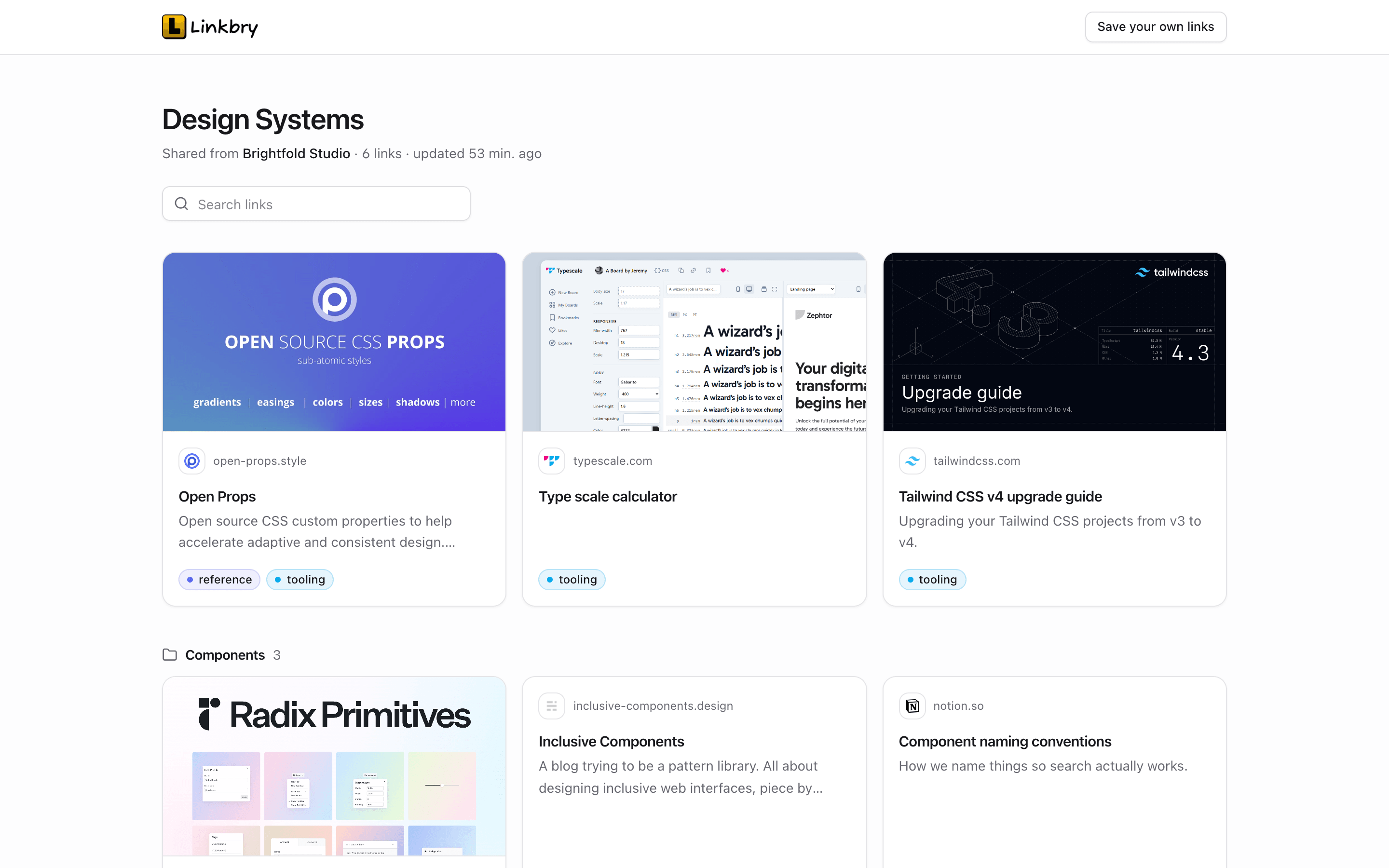
A shared Linkbry page as a visitor sees it: a folder title, a search box and link cards with preview images, grouped into subfolders.
01

Where a team’s links live today, and why it breaks

Real estate links are shared in whatever app is open at the time. That’s quick in the moment and slow every time someone needs the link again.

  • Listing links scattered across text threads with each buyer
  • Forms bookmarked on one agent’s laptop, in last year’s version
  • A vendor list in someone’s phone that leaves when they do
  • Neighbourhood pages rebuilt from scratch for every relocating client
  • The same “where’s the login for…?” question in the team chat every week
02

A read-only page for every buyer or seller

Owners and editors can publish any folder, with its subfolders, as a read-only page at share.linkbry.com. The client doesn’t need an account; they see link cards with previews, your descriptions and a search box. Add a title, your logo and accent colour, a password if the shortlist is private, and an expiry date for when the search ends. You can turn it off whenever you like. Notes, archived links and private links never appear, so internal comments stay internal.

  • Put comments meant for the client in the description; keep the rest in the note
  • Subfolders such as “Saturday viewings” or “Second look” appear as groups on the page
  • Share stats: page views and clicks per link, without identifying visitors
  • Hiding the “Made with Linkbry” footer is a Pro feature
03

Roles for agents, admin and the team lead

Owners (usually the team lead or broker) manage members, billing and deletion, and can restrict folders to named people. Editors add, organise and delete links and publish folders, but only owners delete folders, so nobody wipes the shared forms folder by accident. Viewers (assistants, transaction coordinators or anyone who only needs to find links) read and search for free on Pro. Each agent can keep links private to themselves, and a client’s folder can be restricted to the agents working with them.

  • Owner: members, billing, restricted folders, deleting folders and tags
  • Editor: saves and deletes links, builds and publishes client pages
  • Viewer: reads and searches; free and unlimited on Pro
  • Private links for an agent’s own prospects and research
04

Keeping listings and vendor links current

Listings go under offer, sell and disappear. The background checker re-tests each link at most weekly and flags links that return an error or redirect to another domain. Some portals quietly send a removed listing to a search page on the same site, which won’t be flagged, so archive sold listings as you go; archived links don’t appear on shared pages. For forms and vendor lists, give the key links an owner and a review interval so someone confirms them regularly.

05

On the road

Linkbry is a web app and a Chrome extension, not a native mobile app. Most agents save links from a desktop browser and open them, or the client’s shared page, from their phone’s browser.

  • The web app and shared pages open in a phone’s browser
  • The web app is installable, and on Android you can share a link to Linkbry from other apps
  • A downloadable QR code for any saved link, for flyers and open-house signs
  • No native iOS or Android apps, and no iPhone share-sheet saving
06

Pricing for a real estate team

Free is one person with up to 100 links, and shared pages work on Free, so a solo agent can run client pages without paying. Pro is $10 per owner or editor per month, or $100 a year, with no link limit and free, unlimited viewers. A worked example: a team of eight agents and a team lead who all build client pages is nine editors ($90 a month, or $900 a year), and two admin staff and a transaction coordinator join as free viewers. Clients never need a seat; they open your shared pages without an account.

07

When Linkbry isn’t the right fit

Linkbry isn’t a CRM, an MLS, a transaction-management system or an e-signature tool, and it doesn’t pull listings from your MLS: links are saved by people. It keeps the readable text of saved pages for search, not their photos or layout, so when a portal takes a listing down its details go with it; if you need the photos, save an image or a screenshot with the extension, which stores a copy. And if your team works almost entirely from phones, the lack of native apps will matter.

A starting point

A starter workspace for a real estate team

Share the client’s Shortlist folder rather than its parent, and keep internal links in a sibling folder, because every subfolder of a shared folder is published with it.

FolderWhat goes in itWho sees it
Team HQBrokerage policies, tools, training videos, new-agent checklistEveryone; Editors maintain
Forms & disclosuresLinks to the current offer, disclosure and agency formsEveryone reads; one Editor owns the reviews
Areas / RiversideSchools, planning and transport pages, parks, local servicesEveryone; also a shared page for relocating buyers
VendorsInspectors, surveyors, stagers, photographers, movers and trades, with internal notesEveryone; notes stay internal
Clients / Morgan purchase / ShortlistListings to view, grouped by viewing day, with comments in the descriptionsThe client, via a shared page with an expiry date
Clients / Morgan purchase / InternalOffer notes, comparables, lender and conveyancing linksThe agents on the deal (restricted folder, set by an Owner)
Your prospectingYour own leads, expired listings, market reportsPrivate, visible only to you
FAQ

Questions real estate teams ask.

How much does Linkbry cost for a real estate team?

$10 per owner or editor per month, or $100 a year, with no link limit. Viewers are free and unlimited on Pro. Free covers one person with up to 100 links, including shared client pages.

Do buyers need an account to see their shortlist?

No. A shared page opens for anyone with the link (and the password, if you set one). You can add an expiry date and turn the page off at any time.

Can a client see our internal notes?

Not on a shared page: notes, archived links and private links are never shown. Anything you write in a link’s description is visible, so put client-facing comments there and internal ones in the note. Linkbry stores links, descriptions and notes. Keep signed documents in your transaction system.

Who needs to be an editor?

Anyone who saves links to the shared library or publishes client pages. Viewers can search and open everything they have access to but can’t change it, which suits admin staff. Editors can also delete links; only owners delete folders and tags.

Can we import the links we already have?

Yes. Owners and editors can import a bookmarks HTML file from Chrome, Firefox, Safari, Edge, Brave or Arc, or a CSV, such as a vendor spreadsheet with URL, title, folder and tags columns. Folders, tags and dates are kept and duplicates are skipped.

Can I drop listing links into emails quickly?

With the Chrome extension, type ;; or press Ctrl/Cmd+Shift+K in any text box in the browser (webmail, a web-based CRM, Slack) to search your library and insert a link, formatted or as a plain URL.

Is there a mobile app?

No native app. The web app and shared pages work in a phone’s browser, the web app is installable, and on Android you can share links to it from other apps. iPhone share-sheet saving isn’t supported.

Does Linkbry pull listings from our MLS?

No. There’s no MLS integration; links are saved by your team from the browser, by pasting a URL or by import.

Give real estate teams one place for every link

Free for one person, with your bookmarks imported in a minute.

Link Management for Real Estate Teams: Listings, Forms & Buyers | Linkbry