Find out a link is dead before your client does
Pages move, docs get reorganized, and old wikis get switched off. A saved link that quietly broke is worse than no link, because someone trusts it. Linkbry re-checks your saved links in the background and flags the ones that no longer work.
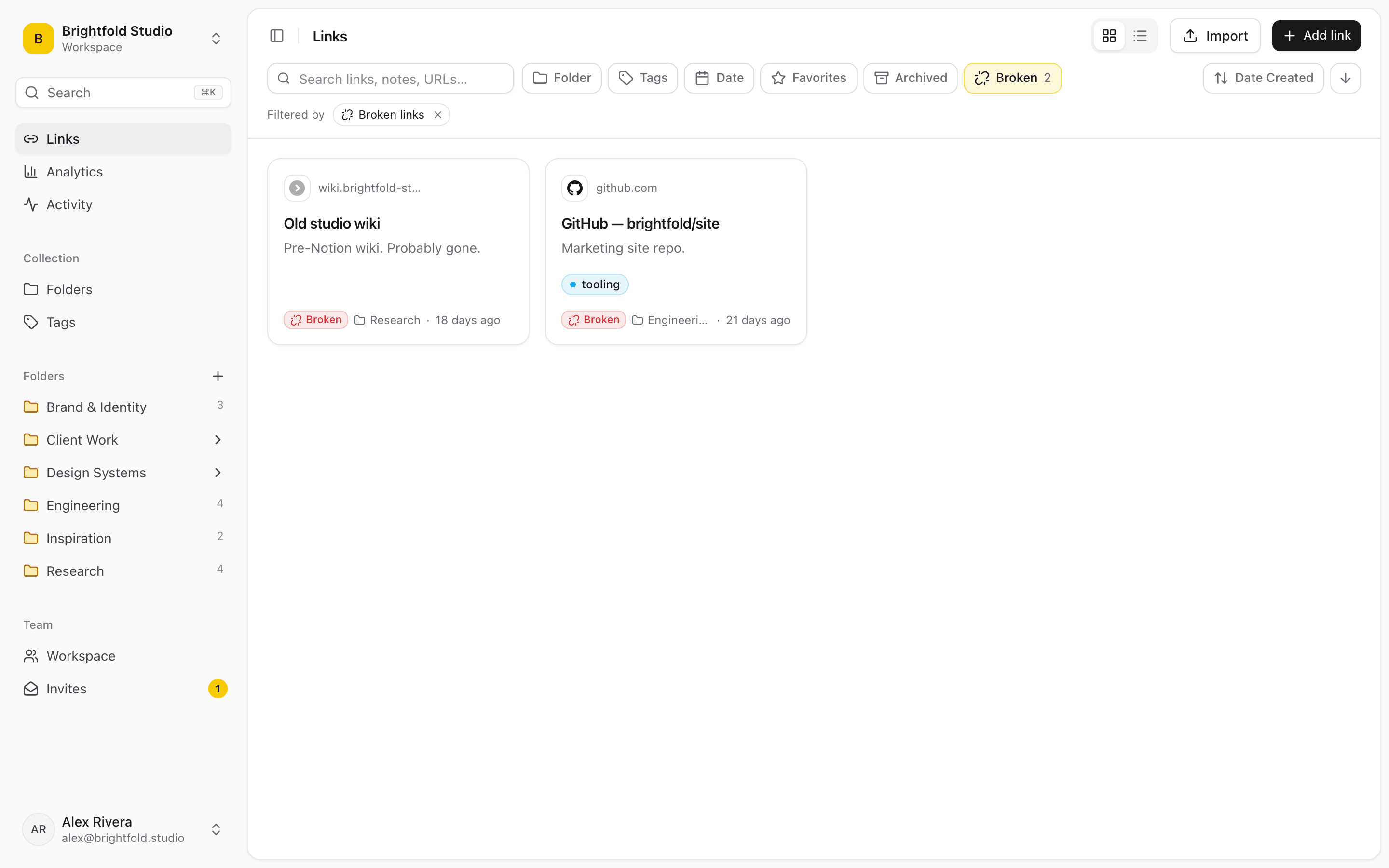
Checked for you, about weekly
You don't run anything. Linkbry re-checks saved links in the background roughly once a week and marks the ones that are broken or that now redirect somewhere else.
- Background re-checks, about once a week
- Flags links that are broken
- Flags links that now redirect elsewhere
- A Broken filter with a count, next to your other filters
Where it matters most
An engineering team's reference docs are the classic case: a vendor restructures their docs site and half the links in Engineering › Payments go nowhere. A design studio's client folders are another. Nobody wants the handoff page to point at a moved Figma file.
Fix them in one pass
Click the Broken filter to see only the flagged links, then update each URL, or select the lot and archive them. The filter lives in the URL, so “broken links in Client Work” is a view you can bookmark.
What it doesn't do
Linkbry tells you a link has broken. It doesn't keep a copy of the page. If you need the content preserved, save it somewhere that archives pages as well.
Start organizing your links today
Free forever for one person. No credit card needed.