Industries

The admin links your practice uses every day, in one shared place

Linkbry is a shared library for the links your practice uses every day, from payer portals and referral forms to guideline references, but not for patient information.

In short

Linkbry is a shared library for your practice’s operational links (payer portals, referral pathways, clinical guideline references, supplier portals, HR and rota links), organised in folders with roles for who can change them. It is not an EHR, stores no patient records, and makes no HIPAA or other healthcare compliance claims, so save links to references and tools only.

What it’s for

What practices use Linkbry for

Week to week

How it works in practice

  1. 01

    Morning: open the day’s portals

    The front desk opens the payer portals and referral forms from one folder instead of hunting through a shared spreadsheet or asking a colleague.

  2. 02

    Midday: answer a routine enquiry

    A patient emails asking for the registration form. The receptionist types ;; in the reply, searches “registration” and inserts the link to the practice’s public form.

  3. 03

    Afternoon: a locum starts

    The practice manager adds the locum as a viewer. They open the onboarding checklist folder and work through the rota, systems and policy links.

  4. 04

    Weekly: review references

    Links whose review date has come up show as needing review. The clinical lead confirms each guideline link is still current and marks it “Still correct”, or replaces it.

  5. 05

    Monthly: fix what moved

    An editor filters to broken links (often a supplier or local service that changed its website) and updates them once for everyone.

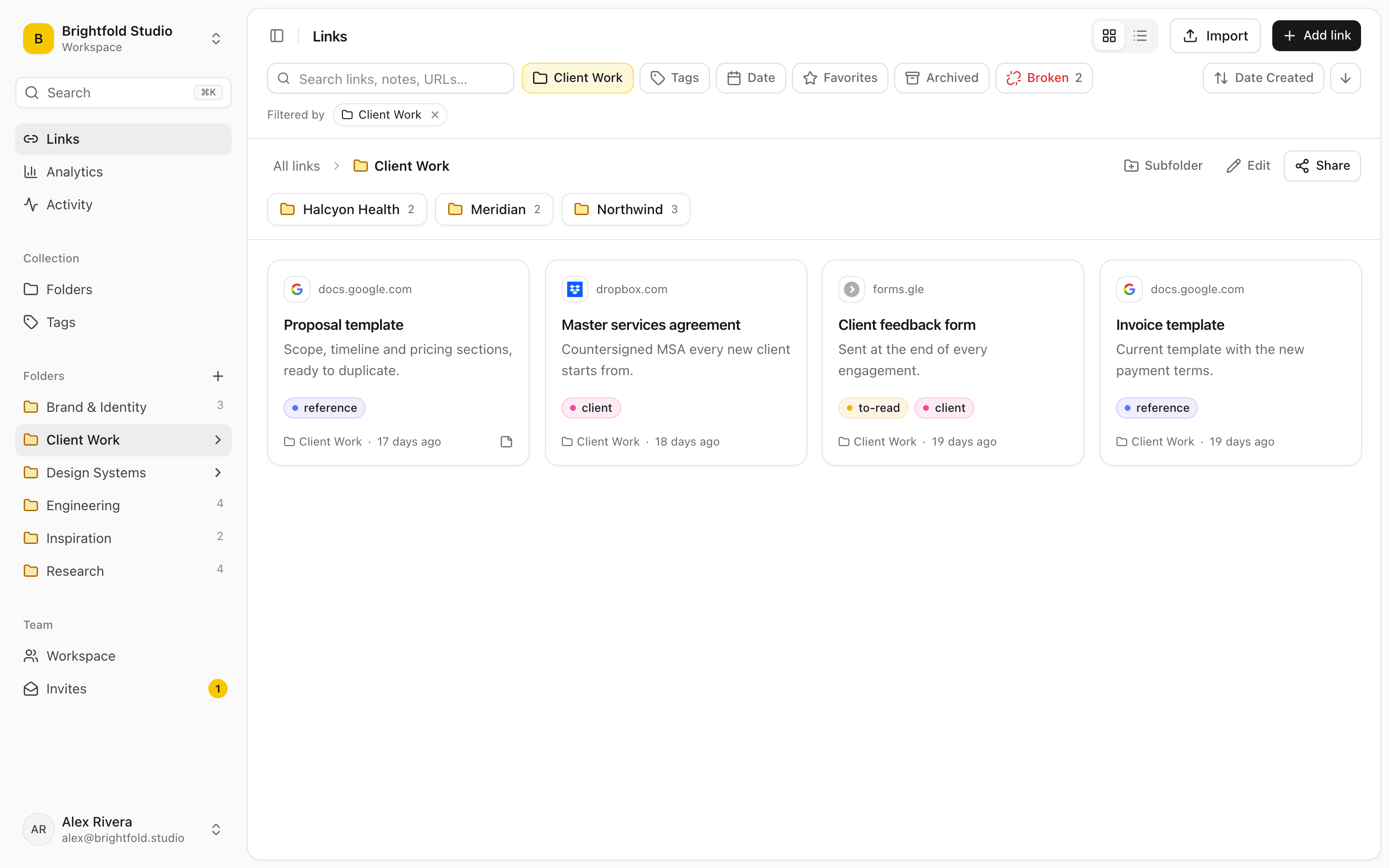
The contents of a Linkbry folder: saved links with titles, site names and tags, listed under the folder name.
01

What Linkbry is and isn’t for in a practice

Linkbry stores links to tools and references: web addresses, titles, tags and your team’s notes about them. It is not an electronic health record or practice-management system, it is not designed to hold patient information, and it makes no HIPAA, GDPR or other healthcare compliance claims. Don’t put patient names, identifiers or clinical details in titles, notes or tags, and don’t save links whose web address itself contains patient information, such as a deep link into a record.

  • Yes: payer portals, referral forms, guideline references, supplier sites, staff links
  • Yes: public health information and forms for patients
  • No: patient records, results, letters or anything identifying a patient
  • No: passwords (keep them in a password manager)
02

Where practice links live today, and why it breaks

Most practices keep their operational links in whatever was easiest at the time. It works until the person who set it up is off sick or leaves.

  • Bookmarks on one shared front-desk computer
  • A printed sheet of URLs taped next to the reception screen
  • A shared spreadsheet with no search and half-dead links
  • Links scattered through staff emails and the practice group chat
  • Locums asking the busiest person in the building where everything is
03

Roles that match how a practice runs

Owners manage the workspace, members and billing. Editors (typically the practice manager, the operations lead or a senior receptionist) add, organise and delete links. Everyone else joins as a viewer and can find and open links without changing anything. Owners can restrict a folder, such as HR or partners’ business links, to named members.

  • Owner: the practice manager or business partner
  • Editors: the people who maintain the folders
  • Viewers: clinicians, reception, locums and temporary staff
  • The activity feed shows who added, moved or changed a link
04

Resource pages for patients

Publish a folder as a read-only page that anyone can open without an account: vaccination information, travel health advice, local support services, registration and repeat-prescription request forms that already live on public websites. Add your practice’s logo and colours, or embed the list on your website. Notes and private links are never shown, and share stats count page views and clicks per link without recording who visited.

05

Keep references current

A guideline link that quietly points to last year’s version is worse than no link. Give reference links an owner and a review interval so they come up for review, and let the background checker flag links that break or move to another domain. Portals behind a login usually answer with an access-denied response, which the checker doesn’t count as broken.

06

What it costs: a worked example

Pro is $10 a month ($100 a year) per owner or editor, and viewers are free and unlimited. A practice where the practice manager and two senior administrators maintain the library, and 25 clinicians, receptionists and locums read it, pays for three people: $30 a month, or $300 a year. The Free plan is for one person with up to 100 links.

07

When Linkbry isn’t the right fit

If you need somewhere to store or share patient information, Linkbry is the wrong tool: use your clinical system and the secure channels your organisation approves. Linkbry doesn’t store documents in place of your policy library, isn’t a rota or HR system, and has no native mobile apps (it’s a web app and a Chrome extension). If your organisation requires SAML single sign-on or specific compliance certifications for every tool, check those requirements before adopting it.

A starting point

A starter workspace for a practice

Only links to tools, references and public pages, never patient information.

FolderWhat goes in itWho sees it
Payers & billingInsurer and payer portals, claims and eligibility sites, with notes on useOwners and editors; viewers can read
ReferralsReferral forms and service pages, a subfolder per specialtyEveryone in the workspace
Clinical referencesGuidelines, formularies and calculators, each with an owner and review dateEveryone in the workspace
SuppliersOrdering portals for supplies, vaccines and equipment servicingOwners and editors; viewers can read
Staff / Start hereRota, HR portal, policies, IT systems, who-to-ask (as a checklist)Everyone in the workspace
HR & practice businessPayroll, contracts portal, accountant and partner linksNamed members only (restricted folder)
Patient informationPublic health advice, local services, public formsAnyone with the link, via a shared page
FAQ

Questions clinics and healthcare practices ask.

Can we store patient information in Linkbry?

No. Linkbry is for links to tools and references. It isn’t an EHR, isn’t designed to hold patient data and makes no HIPAA or other healthcare compliance claims. Keep patient information in your clinical system.

What does Linkbry actually store?

For each link: the web address, a title, description and preview fetched from the page, your tags and a note, plus the readable text of public web pages for search. It doesn’t store the logins for the portals you link to.

How much does it cost for a practice?

$10 a month or $100 a year per owner or editor. Viewers (clinicians, reception and locums who only need to open links) are free and unlimited on Pro.

Can locums and temporary staff get access without a paid seat?

Yes. Invite them as viewers by email, or with an invite link set to the viewer role with an expiry date and a use limit. Remove them from the workspace when their placement ends.

How does the ;; picker help the front desk?

With the Chrome extension installed, type ;; in any text box (an email reply, a web form, a chat), search your saved links and press Enter to insert one. Useful for sending patients the link to a public form or information page.

Can we share information pages with patients?

Yes. Publish a folder of links to public health information and forms as a read-only page patients open without an account. You can brand it with your logo and colours, or embed it on your website.

Can we import the links we already have?

Yes. Import a bookmarks file from Chrome, Firefox, Safari, Edge, Brave or Arc with its folders intact, or a CSV from a spreadsheet. Duplicates are skipped. Owners and editors can run imports.

Give clinics and healthcare practices one place for every link

Free for one person, with your bookmarks imported in a minute.

Shared Links for Clinics: Payer Portals, Referrals & Staff Links | Linkbry