Industries

One shared library for your nonprofit’s links, free for everyone who only reads it

Linkbry gives your nonprofit one shared place for grant portals, volunteer resources and program toolkits, which volunteers and the board can read for free.

In short

Use Linkbry as your organisation’s shared link library: a folder per grant cycle, program and volunteer role, with a note on each link explaining what it’s for. A few staff curate it as paid editors; volunteers, trustees and partners join as free, read-only viewers. Publish a folder as a public page for beneficiaries or volunteers, which opens without an account.

What it’s for

What nonprofits use Linkbry for

Week to week

How it works in practice

  1. 01

    Monday: save as you go

    The development lead finds a new funding call and saves it with the Chrome extension, choosing the Grants folder and adding a note with the deadline and eligibility.

  2. 02

    Tuesday: onboard new volunteers

    The volunteer coordinator sends new starters an invite link that joins them as viewers. They work through the onboarding checklist folder in their own time.

  3. 03

    Wednesday: answer questions in one keystroke

    A volunteer asks in the group chat where the expenses form is. The coordinator types ;; in the reply box, searches “expenses” and inserts the link.

  4. 04

    Thursday: update the public page

    A partner service changes its referral form. A staff editor updates the link once, and the public resources page on the website shows the new one straight away.

  5. 05

    Friday: tidy up

    Someone filters to broken links and fixes the ones the background checker has flagged, usually funder pages that moved when a foundation rebuilt its website.

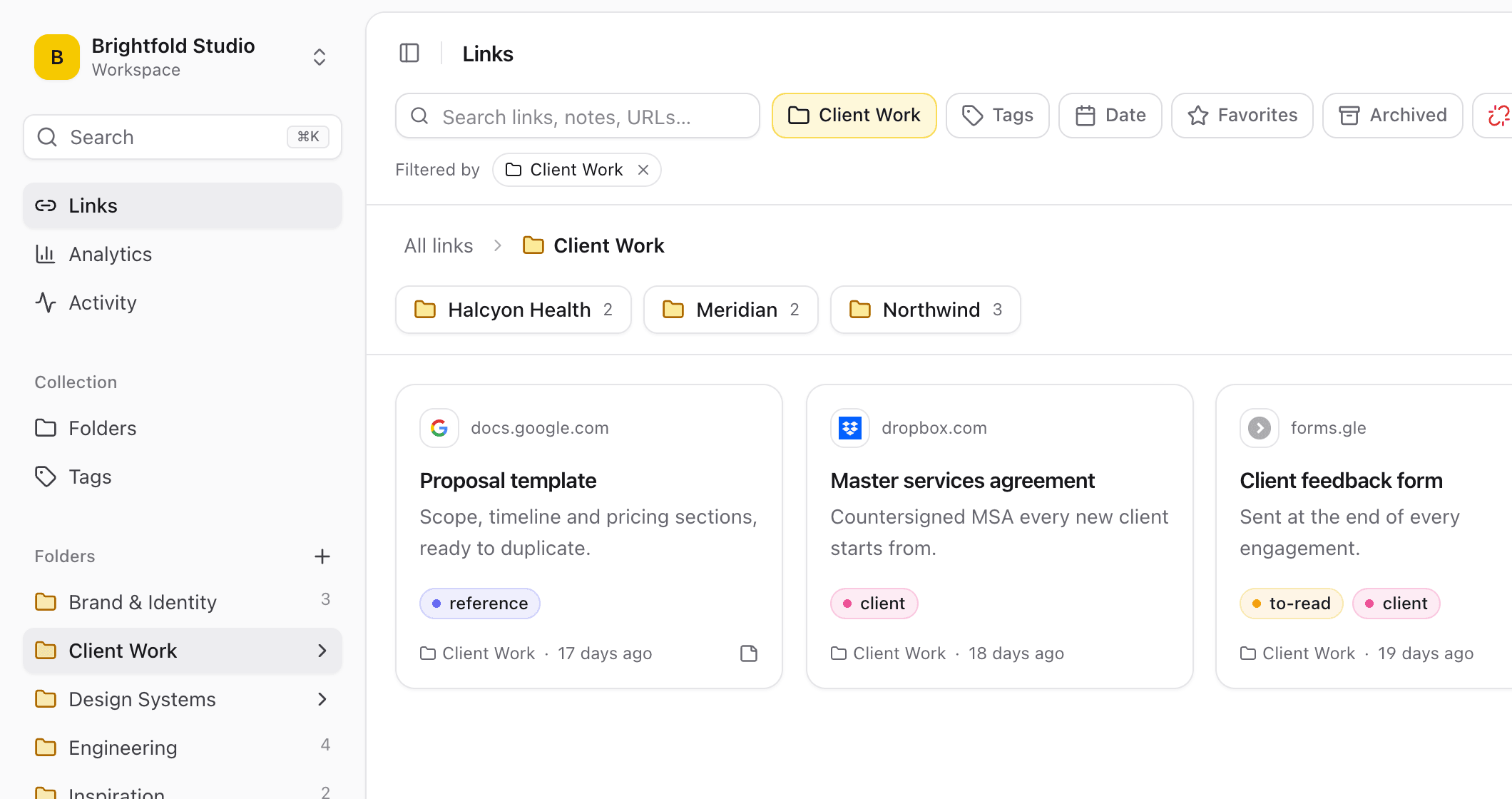
A Linkbry workspace with nested folders in the sidebar and the links of the selected folder shown as cards.
01

Where nonprofit links live today, and why it breaks

Small teams with high turnover lose links fastest. When the person who knew where everything was leaves, their bookmarks leave with them.

  • One staff member’s browser bookmarks, invisible to everyone else
  • A “useful links” spreadsheet that stopped being updated two grant cycles ago
  • Volunteer handbooks with URLs that broke when a partner moved its site
  • Links pasted into group chats and email threads, gone within a week
  • A resources page on the website that only one person can edit
02

Many readers, a few curators

Most people in a nonprofit need to find links, not maintain them. Linkbry’s roles match that: owners manage members and billing, editors add, organise and delete links, and viewers read. On Pro, viewers are free and unlimited, so every volunteer, trustee and partner can have access without adding to the bill.

  • Owners: the operations or IT lead who manages the workspace
  • Editors: staff who curate grants, programs and volunteer resources
  • Viewers: volunteers, trustees, interns and partner organisations
  • Restricted folders: owners can limit a folder, such as HR or board papers, to named members
  • Private links: keep a link to yourself inside the shared workspace
03

A public page for beneficiaries and volunteers

Any folder, subfolders included, can be published as a read-only page on share.linkbry.com that anyone can open without signing up. Give it your own title, description, accent colour and logo, add a password or expiry date if it’s for a specific group, and turn it off whenever you like. Notes, archived links and private links are never shown. You can also embed the list on your website with an iframe, and share stats show page views and clicks per link without recording who visited.

  • “Help in your area” for service users: local services, help lines, forms
  • “Volunteer resources” for people who aren’t members of the workspace
  • A reading list for funders or partners, password-protected and set to expire
04

Keep grant and policy links from going stale

Funder guidelines and eligibility rules change every cycle, and an old link can cost you an application. Give those links an owner and a review interval so they show as needing review when they’re due, and let the background broken-link checker flag pages that have broken or moved to another domain.

05

What it costs: a worked example

Pro is $10 a month ($100 a year) for each owner or editor; viewers are free and unlimited. A nonprofit with three staff who curate the library, 40 volunteers and eight trustees pays for three people: $30 a month, or $300 a year. The Free plan is one person with up to 100 links, enough to set up the folders and try a public page before you invite anyone.

06

Move in without retyping anything

Import the bookmarks your staff already have, or a CSV of the links in your old spreadsheet. Chrome, Firefox, Safari, Edge, Brave and Arc exports keep their folders, tags and original save dates. Duplicates are skipped. Any member can export the library as HTML or CSV, so it never gets locked in one person’s account again.

07

When Linkbry isn’t the right fit

Linkbry stores links, notes and the readable text of saved web pages, not your documents, donor records or case files. Keep those in your document storage, CRM or case-management system and save links to them. It isn’t a volunteer-scheduling, fundraising or grant-tracking system, and there are no native mobile apps: it’s a web app and a Chrome extension. If you need full archived copies of pages, use an archiving tool alongside it.

A starting point

A starter workspace for a nonprofit

Publish the public folders on their own, because subfolders of a shared folder are published with it.

FolderWhat goes in itWho sees it
Grants / 2026 cycleFunder portals, guidelines, deadlines in notes, reporting templatesOwners and editors; viewers can read
Volunteers / OnboardingHandbook, training, rota sign-up, group chat (as a checklist)Everyone in the workspace
ProgramsToolkits, referral directories and forms, a subfolder per programEveryone in the workspace
Research & evidenceReports, statistics and evaluations, with the figure each supports in its noteEveryone in the workspace
BoardLinks to agendas, minutes, financial reports and policiesTrustees and senior staff (restricted folder)
Help in your areaLocal services, help lines and forms for service usersAnyone with the link, via a shared page
FAQ

Questions nonprofits ask.

How much does Linkbry cost for a nonprofit?

Pro is $10 a month or $100 a year per owner or editor. Viewers are free and unlimited, so volunteers, trustees and partners who only read the library don’t add to the cost. The Free plan is one person with up to 100 links.

Can volunteers see the links without paying?

Yes, on Pro. Invite them as viewers, by email or with an invite link that sets the viewer role and can expire. Viewers can browse, search and open every link they have access to, but can’t add, change or delete anything.

Can we keep board or HR links separate from volunteers?

Yes. Owners can restrict a folder to named members; everyone else can’t see it or its links anywhere, including search and exports. Individual links can also be kept private to the person who saved them.

Can people outside the organisation see our resources?

Yes. Publish a folder as a read-only public page: anyone with the link can open it without an account. Add your logo and colours, set a password or expiry date if you need one, or embed it on your website.

What does Linkbry store?

Links, with a title, description, tags and your note, plus the readable text of saved web pages for search. It isn’t a place for donor records, case notes or documents. Keep those where they are and save a link.

Can we import our existing links?

Yes. Import browser bookmarks from Chrome, Firefox, Safari, Edge, Brave or Arc with folders and tags intact, or a CSV exported from a spreadsheet. Duplicates are skipped.

What is the ;; picker?

A feature of the Chrome extension: type ;; in any text box (Gmail, Slack, WhatsApp Web, a Google Doc), search your saved links and press Enter to insert one. It’s the quickest way to answer “where’s that form?”.

Give nonprofits one place for every link

Free for one person, with your bookmarks imported in a minute.

Link Library for Nonprofits: Grants, Volunteers & Resources | Linkbry