Industries

Every source link behind a story, where the whole desk can find it

Linkbry gives a desk one shared library for the links behind its reporting, with a folder per story and a note on every link saying why it matters.

In short

Use Linkbry as a newsroom’s shared research library: a folder per story with the source and document links behind it, a note on each explaining what it shows, and standing folders for public records portals, style guides and verification tools. Search covers titles, notes and the readable text of saved pages, and the broken-link checker flags sources that disappear. It stores links and text, not a full archive.

What it’s for

What newsrooms use Linkbry for

Week to week

How it works in practice

  1. 01

    Assignment: open a story folder

    The reporter creates a folder for the story and saves the first documents with the Chrome extension, selecting the key passage so it becomes the link’s description.

  2. 02

    Reporting: note why each source matters

    Each new link gets a note: the claim it supports, the page or timestamp, how it was verified. Colleagues on the desk can see the folder as it grows.

  3. 03

    Editing: check against the sources

    The editor and fact-checker work from the story folder, searching notes and page text to find the source behind a line in the copy.

  4. 04

    Publication: share the reading list

    For an investigation, an editor publishes a subfolder of public sources as a read-only page and links to it from the story. Notes are never shown.

  5. 05

    Months later: follow-ups and corrections

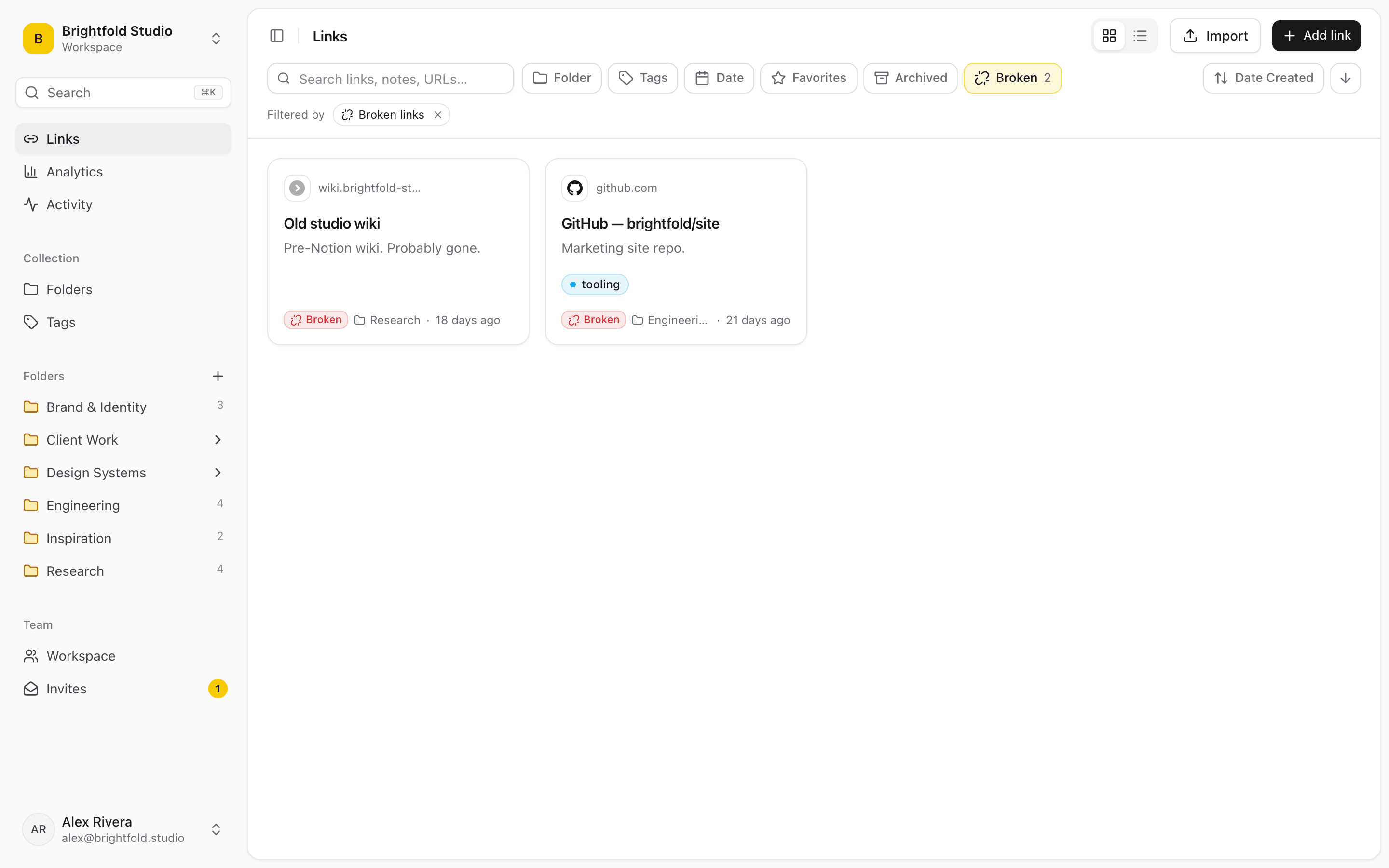
    When a reader questions a story, the folder is still there. The Broken filter shows which sources have since disappeared or moved.

Linkbry’s Broken filter, listing saved links the checker has flagged as broken or moved.
01

Where story sources live today, and why it breaks

Sources are gathered under deadline, in whatever was open. That’s fine on the day; it fails when someone else needs them weeks later.

  • Browser tabs and personal bookmarks that leave with the reporter
  • Links pasted into the draft, the chat or a notes app, with no context
  • A shared doc of “useful portals” that nobody updates
  • Style and standards links buried in an intranet
  • Sources for old stories that have quietly disappeared from the web
02

Context on every link

Each link has a description, usually filled in from the page, and a separate note for the desk’s own context: what the source shows, where in it, how it was verified and how far to trust it. Tags mark source type and status. Search matches titles, URLs, descriptions, notes and site names, and the readable text Linkbry captures from saved web pages.

  • Note format: claim · location in source · how verified
  • Tags: document, record, data, social, interview, press release
  • Highlights: keep several passages from one source
  • Comments and @mentions to query a source with a colleague
03

Roles and restricted folders

Owners manage the workspace and members. Editors (reporters and desk editors) add, organise and delete links, but only owners delete folders, so a story folder doesn’t vanish by accident. Viewers, such as the copy desk, social team or a freelancer, can search and open links without changing them. Owners can restrict a folder to named members, hiding it from everyone else in search, the picker and exports, which is useful for embargoed or sensitive stories.

04

Sharing sources outside the newsroom

Publish any folder, subfolders included, as a read-only page anyone can open without an account: the public documents behind an investigation, background reading for a partner newsroom, or a press kit list. Add a password and expiry date for a partner, or your own title and logo. Notes, archived and private links are never shown, and you can turn the page off at any time.

05

Old sources, checked

Links rot fastest on the stories you’ll be asked about later. Linkbry’s checker re-checks each saved link in the background, at most every seven days, and flags links that return errors or now redirect to another domain. Owners and editors can also re-check a link on demand. It tells you a source has gone; it doesn’t keep a copy of it.

06

What it costs: a worked example

Pro is $10 a month ($100 a year) per owner or editor, and viewers are free and unlimited. A desk where eight reporters and editors save sources, and 12 people on the copy desk, social and graphics only read them, pays $80 a month or $800 a year. A freelancer working alone can use the Free plan: one person, up to 100 links.

07

When Linkbry isn’t the right fit

Linkbry is not an archive. It keeps links, notes and the readable text of web pages (not screenshots, PDFs or full copies), so preserve evidence with an archiving tool such as the Wayback Machine and save the archived link alongside the original. It isn’t a secure channel for confidential sources: don’t record source identities or sensitive contact details in it. It isn’t a CMS or a document store, and there are no native mobile apps.

A starting point

A starter workspace for a desk

Keep a public subfolder inside each story folder for anything you might publish as a reading list.

FolderWhat goes in itWho sees it
Stories / [story slug]Documents, records, coverage and data behind one story, with notesOwners and editors; viewers can read
Stories / [story slug] / Public sourcesThe sources you’re willing to show readersAnyone with the link, via a shared page
EmbargoedLinks to embargoed releases and material under embargoNamed members only (restricted folder)
Records & dataCourt records, company registries, planning and government data portalsEveryone in the workspace
VerificationReverse image search, archive tools, geolocation and metadata toolsEveryone in the workspace
Style & standardsStyle guide, corrections policy, legal and ethics guidanceEveryone in the workspace
FAQ

Questions newsrooms and journalists ask.

How much does Linkbry cost for a newsroom?

$10 a month or $100 a year per owner or editor. Viewers are free and unlimited on Pro, so people who only need to read the library (copy desk, social, freelancers) don’t add to the cost.

Does Linkbry archive the pages we save?

No. It stores the link, your note and the readable text of web pages for search, not screenshots, PDFs or a full copy. Use an archiving tool to preserve evidence and save the archived link too.

Can we keep embargoed material away from the rest of the newsroom?

Yes. Owners can restrict a folder to named members; nobody else sees it or its links anywhere, including search and the picker. Individual links can also be kept private.

Who can change a story folder?

Owners and editors can add, organise and delete links; only owners delete folders and tags. Viewers can search and open links only. The activity feed shows who added, moved or changed what.

What is the ;; picker?

A feature of the Chrome extension: type ;; in any text box (your CMS, Slack, email, a Google Doc), search your saved links and press Enter to insert one. Handy for dropping the style-guide entry or a source link into a note to an editor.

Can we share our sources with readers?

Yes. Publish a folder as a read-only page that anyone can open without an account. Your notes are never shown, and you can turn it off at any time.

Can I import the bookmarks I already have?

Yes. Import a bookmarks file from Chrome, Firefox, Safari, Edge, Brave or Arc with its folders intact, or a CSV. Duplicates are skipped.

Give newsrooms and journalists one place for every link

Free for one person, with your bookmarks imported in a minute.

Research Links for Newsrooms: Sources, Records & Style Guides | Linkbry