The right help link in every reply, without leaving the ticket
Support and customer success teams answer the same questions with the same links: help-centre articles, setup guides, the status page, release notes and video walkthroughs. Linkbry keeps them in one shared, searchable library, inserts them — or a whole canned response — into any ticket, chat or email by typing ;;, and turns a customer’s onboarding links into a single page.
Last updated
In short
Linkbry gives support and CS teams one library of help links and reply snippets that works in every browser-based tool: type ;; in the helpdesk, email or chat to insert a link or snippet. Customer onboarding pages are branded, shareable folders, and the link checker catches help articles that were renamed or removed. Agents who only insert content can be free viewers.
What support and CS teams use Linkbry for
A help-link library
Help-centre articles, setup guides, videos and troubleshooting docs organized by product area, searchable by title, description, note or page text.
Canned responses that work in any tool
Reply snippets for common questions, inserted with ;; in the helpdesk, Gmail, chat or social inbox — one set of answers instead of a copy in every tool.
Customer onboarding pages
A branded page per account with the kickoff deck, setup guides, training videos and success plan. Share stats show which guides the customer actually opened.
Runbooks and escalation
The status page, incident process, admin tools and escalation contacts in one restricted folder, with go links like go/status and go/escalate.
Catching moved help articles
When the docs team renames an article, the link checker flags it as broken or moved before agents keep sending customers to a 404.
Onboarding new agents
A checklist folder of the articles, tools and policies every new agent needs, with progress visible to the team lead.
One answer, five places
Most teams maintain the same answers several times over, and each copy drifts.
- Macros in the helpdesk, templates in email, saved replies in chat
- Help-article links bookmarked by individual agents
- Onboarding guides re-sent to every new customer by hand
- Links that break silently when the help centre is reorganized
Canned responses that follow you across tools
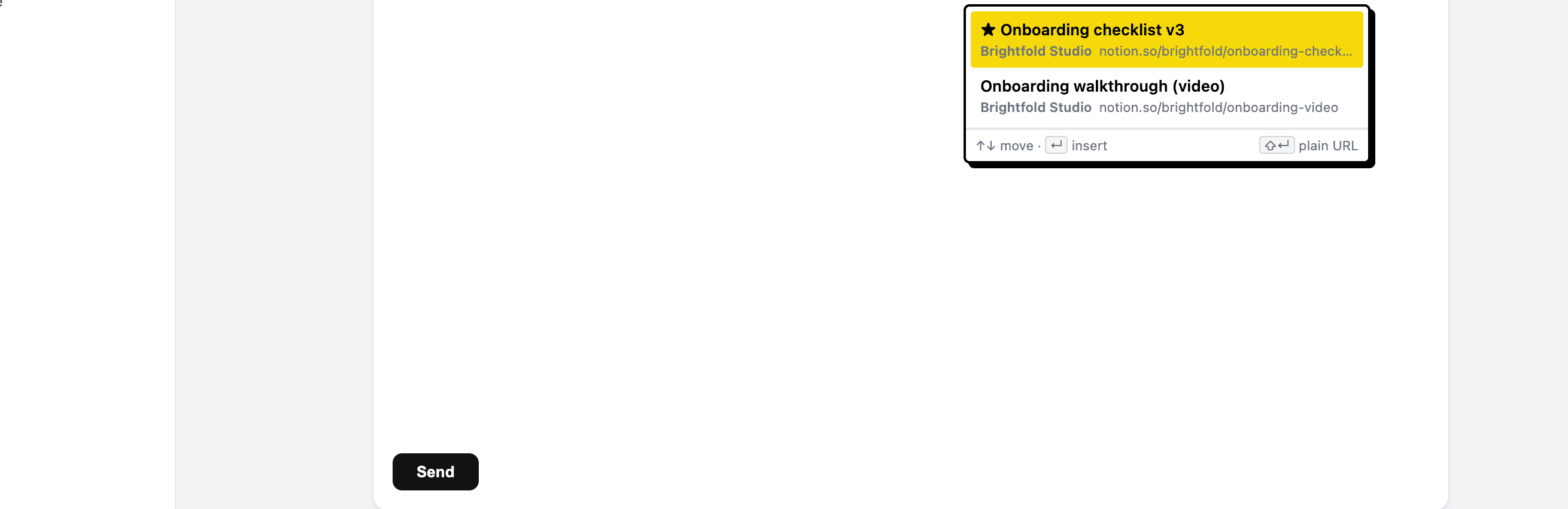
Native canned responses only work inside the tool that stores them. Linkbry snippets and links live in one shared library and insert into any text box in the browser through the Chrome extension: type ;; or press Ctrl/Cmd+Shift+K, search, and press Enter. Links go in formatted, or as a plain URL with Shift+Enter. Keep your helpdesk macros for automation; use Linkbry for the answers you type everywhere.
Customer onboarding pages
Publish a customer’s onboarding folder as a read-only page with their name, your logo and accent colour. Add a password if it includes anything account-specific. The customer opens it without an account, and you can see views and clicks per link.
When help articles move
Give key articles an owner and a review interval, and Linkbry shows them as due for review. The background checker flags broken links and links that now redirect to another domain, and editors can re-check a link on demand after a docs migration.
Pricing for support teams
The people who maintain the library are $10 a month each on Pro, or $100 a year. Agents who only search and insert links and snippets can be free viewers.
When Linkbry isn’t the right fit
Linkbry isn’t a helpdesk or a public knowledge base, and it doesn’t integrate with ticketing tools. The picker works in Chromium browsers with the extension installed, not in desktop apps.
A starter workspace for support and CS
| Folder | What goes in it | Who sees it |
|---|---|---|
| Help centre / by product area | Articles, setup guides, videos | The whole team |
| Snippets | Greetings, troubleshooting steps, escalation and follow-up replies | The whole team |
| Runbooks | Status page, incident process, admin tools, escalation contacts | Support and engineering (restricted folder) |
| Customers / Account / Onboarding | Kickoff deck, setup guides, training videos, success plan | The customer, via a branded page |
| Release notes | Changelog entries and announcements to link in replies | The whole team |
Frequently asked questions
No. Macros that change ticket fields or trigger automations stay in your helpdesk. Linkbry is for the links and reply text you use across every tool, inserted with the Chrome extension.
It works in text boxes and rich editors in the browser, which includes browser-based helpdesks. It doesn’t work in desktop apps.
No. Agents invited as viewers can search the library and insert links and snippets for free. Only people who add or edit content need an editor seat.
It isn’t built for that. You can share a folder of help links as a read-only page, but for a public, searchable knowledge base use a help-centre tool.
Start organizing your links today
Free forever for one person. No credit card needed.